

Now Reading: How to Use Autotune & Pitch Correction with Antares Auto Tune Pro
-
01
How to Use Autotune & Pitch Correction with Antares Auto Tune Pro


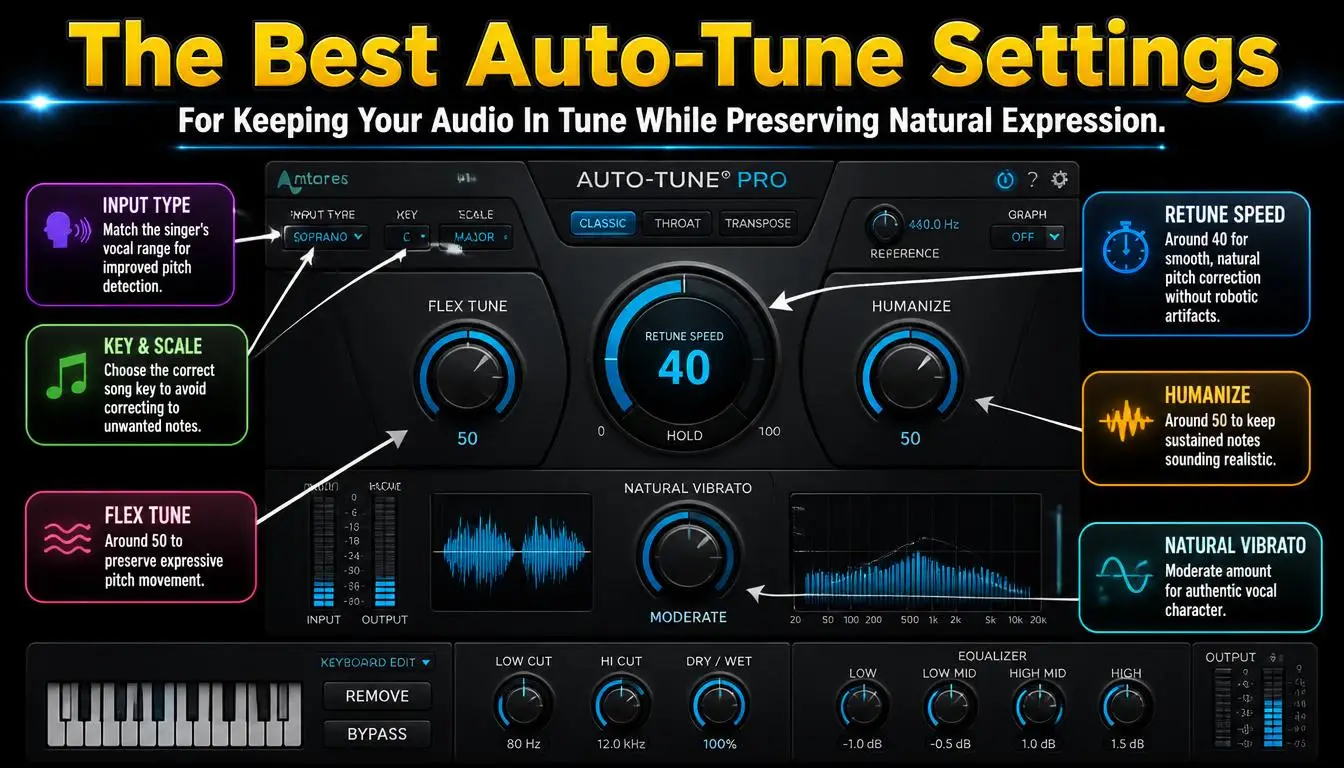
Delve into the world of vocal perfection and creative sound design as we explore the ins and outs of using Antares Auto Tune Pro. This comprehensive guide will help you understand, apply, and master autotune and pitch correction techniques, transforming your vocal tracks and achieving professional grade audio in your music production workflow.
Understanding Autotune
What is Autotune?
Autotune, often synonymous with Antares Auto Tune, is a sophisticated audio processor designed to correct the pitch of vocals and instrumental performances. It serves as an essential pitch correction tool in modern music production, allowing artists and engineers to fine tune vocal performances, ensuring every note is perfectly in key. While widely recognized for its distinctive vocal effect, autotune is much more than just a robotic sound; it is a versatile plug in that provides pitch perfection.
How Autotune Works
At its core, autotune works by analyzing the incoming audio signal, specifically the vocal pitch, and comparing it against a user defined key and scale. If the detected pitch deviates from the target, the autotune software automatically adjusts it to the nearest in key note. This real time pitch correction can be applied subtly for transparent correction or more aggressively to achieve the well known autotune effect, often referred to as the robotic effect, depending on the retune speed and other parameters.
The Science Behind Autotune
The science behind autotune, pioneered by Antares Audio Technologies founder Andy Hildebrand, involves complex digital signal processing algorithms. The plugin precisely identifies the fundamental frequency of a vocal track and then, using phase vocoder technology, shifts the pitch without altering the timing or formants. This sophisticated method allows Antares Auto Tune Pro to seamlessly correct pitch in both auto mode for real time applications and graph mode for meticulous, detailed editing, ensuring the vocal remains natural while achieving perfect pitch.
Getting Started with Antares Auto Tune Pro
Installation and Setup
To begin using Antares Auto Tune Pro, there are a few initial steps to follow:
- First, ensure a smooth installation of the plug in into your preferred Digital Audio Workstation (DAW).
- Make sure to download the correct version for your operating system and DAW compatibility.
Once installed, Auto Tune Pro will appear in your list of available plugins, ready to be inserted onto a vocal track. This essential pitch correction tool integrates seamlessly into your music production workflow, allowing you to quickly access its powerful features.
Basic Features of Auto Tune Pro
Antares Auto Tune Pro offers a robust set of basic features for both subtle pitch correction and pronounced vocal effects. Its core functionality revolves around the ability to correct the pitch of a vocal performance in real time. Key parameters like the retune speed allow you to adjust how quickly the autotune software pulls a note to its target, ranging from transparent correction to the distinct robotic effect. Understanding these fundamental controls is crucial to effectively use autotune.
Exploring the User Interface
The user interface of Antares Auto Tune Pro is designed for clarity and efficiency, enabling you to use autotune with precision. It typically features both an Auto Mode for real time processing and a Graph Mode for detailed, manual adjustments. Familiarizing yourself with the controls for setting the key and scale, input type, and various visual feedback elements will greatly enhance your ability to correct pitch accurately and creatively. Exploring the interface is key to mastering this powerful plug in.
How to Use Autotune Effectively
Choosing the Right Settings
Choosing the right settings is paramount to effectively use autotune to enhance a vocal track. Consider the genre and desired vocal effect; for natural sounding pitch correction, a slower retune speed and subtle application are ideal. For the iconic autotune sound signature popular in electronic music, a faster retune speed will deliver the robotic effect. Experiment with different key and scale settings to ensure the autotune corrects pitch precisely within your song’s harmonic structure.
Applying Autotune in a DAW
Applying autotune within your DAW involves inserting Antares Auto Tune Pro as an insert effect on your vocal track. In Auto Mode, the plugin will automatically correct the pitch in real time as the audio plays. For more nuanced control, you can utilize the following modes:
- Switch to Graph Mode, where you can visually see and manually adjust individual notes.
- Meticulously correct pitch, ensuring every aspect of the vocal performance is perfected.
This makes it a versatile tool for any music production.
Tips for Vocal Correction
When using autotune for vocal correction, focus on subtle adjustments first. To effectively correct pitch while preserving the natural feel of the vocal, consider these tips:
- A common mistake is to over apply the autotune effect, leading to an unnatural or robotic sound.
- Utilize the Graph Mode to target specific problematic notes rather than globally applying a high retune speed.
- Ensuring a clean initial vocal recording will result in more transparent pitch correction.
Advanced Techniques for Vocal Effects
Using Autotune in Live Performances
Utilizing autotune in live performances requires a specialized approach compared to studio recording. Many artists use autotune software like Antares Auto Tune in real time to ensure pitch perfection during a show. This often involves specific hardware or a dedicated computer rig to run the plug in, maintaining a low latency crucial for a seamless vocal performance. Setting the correct key and scale beforehand is paramount for the autotune to correct pitch effectively without introducing an undesirable robotic effect, preserving the natural flow of the live vocal.
Layering Effects for Enhanced Vocals
Beyond simple pitch correction, layering autotune with other vocal effects can create truly unique and enhanced vocal tracks. Combining subtle autotune with delays, reverbs, or modulation effects can add depth and character to a vocal performance. For instance, a light touch of autotune to correct pitch, followed by a wide stereo delay, can make a vocal sound expansive and polished. Experimenting with different effect chains in your DAW allows you to discover new textures and sound signatures, going beyond just the basic autotune effect.
Common Mistakes to Avoid
When working with autotune, several common mistakes can detract from the quality of your music production. One frequent error is setting the retune speed too fast for a natural sound, resulting in an obvious robotic effect. Another is failing to correctly set the key and scale of the song, causing the autotune to pull notes to incorrect pitches. Over reliance on the auto mode without using graph mode for problematic sections can also lead to an artificial sounding vocal. Always strive for a balanced approach to correct pitch effectively while maintaining musicality.
Exploring Autotune Plugins
Best Autotune Plugins for Different Needs
The market offers a diverse range of autotune plugins, each catering to different music production needs and budgets. While Antares Auto Tune Pro remains an industry standard for comprehensive pitch correction and advanced vocal effects, other plugins provide excellent alternatives. For those seeking a simpler, more affordable solution, options like Waves Tune Real Time or Celemony Melodyne Essentials offer powerful pitch correction capabilities. The “best” plugin often depends on the desired vocal effect, the depth of control required, and the specific workflow of the user, from subtle adjustments to pronounced autotune sounds.
Comparing Antares Auto Tune with Other Plugins
When comparing Antares Auto Tune with other pitch correction software, Antares Auto Tune Pro often stands out for its advanced graph mode, offering unparalleled control over individual notes for meticulous pitch correction. While many plugins offer real time pitch correction, Antares Auto Tune’s heritage and continuous innovation provide a robust and feature rich experience. Other plugins, however, may offer different approaches to vocal processing or integrate more seamlessly with specific DAWs. The key is to assess which autotune plug in best aligns with your music production goals and creative vision for a polished vocal performance.
Integrating Autotune with Other Vocal Effects
Integrating autotune with other vocal effects is crucial for creating professional and dynamic vocal tracks. Place the autotune plug in early in your vocal chain to correct pitch before applying time based effects like reverb or delay. This ensures that the corrected vocal performance is what gets processed by subsequent effects, leading to a cleaner and more coherent sound. Experiment with side chaining effects, or using parallel processing within your DAW, to blend the autotune effect seamlessly, enhancing the overall sound signature of your vocal track without sounding overly processed or robotic.
Related Posts



Stay Informed With the Latest & Most Important News
Previous Post
Next Post


Advertisement